
Crypto can drop, or bounce, in a few hours. Pre-set your prices and your orders are live when it happens.

Bitcoin just fell to levels it hadn’t seen in over two years, slipping below $56,000 on Saturday, November 21st, for the first time since September 2024. That’s less than half its all-time high. Meanwhile, Ethereum was at lows it hadn’t seen in nearly five months, and the Crypto Fear & Greed Index has spent the week between 10 and 12, deep in “Extreme Fear”.
The drop was fast. In about 15 hours, bitcoin fell roughly $6,000. Eight hours later, it had won back most of it.
How far has the crypto market fallen?
- Bitcoin: about $60,300 at 21:00 UTC on November 21, 2026 (CoinGecko). That’s 52% below its all-time high of $126,080, set in October 2025, and about 26% lower than 30 days ago.
- Ethereum: about $1,683 at the same time (CoinGecko), 66% below its all-time high of $4,946 from August 2025, and about 29% lower than 30 days ago.
- Sentiment: the Crypto Fear & Greed Index (Alternative.me) read between 10 and 12 every day from November 19th to 22nd, all “Extreme Fear”.
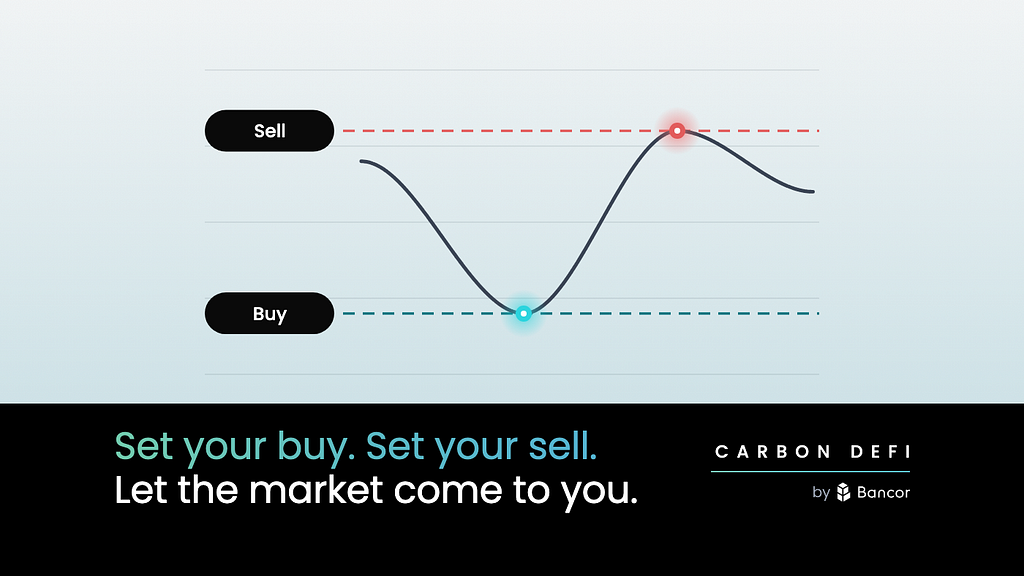
Crypto is known for this kind of volatility: sharp drops and sharp bounces, often at hours when you aren’t watching. The beauty of an orderbook-style DEX like Carbon DeFi, built by Bancor, is that you don’t have to be watching. You can pre-set your target buy price and your target sell price, and leave your orders onchain until the market gets there.
This guide shows how.
Why a move like this is hard to trade manually
Saturday’s low came at 06:00 UTC, and the bounce peaked eight hours later. To manually buy near the bottom and sell into the bounce, you would have needed to be aware of the price action, at your screen for both, and able to act fast while the price was moving.
Most people aren’t, and in a fast moving market like crypto, even those who are tend to hesitate.
Setting your prices in advance shifts the decision from an emotional reaction to a planned strategy, with price certainty.
When you swap on an AMM, the price you see before placing your trade is NOT the same amount you receive once it’s executed.
When you create an order on Carbon DeFi, the price you determine at the time of creation IS the same amount you receive once it’s filled.
Limit and Range Orders
A limit order on Carbon DeFi buys or sells a token at the exact price the maker sets.
A range order buys or sells gradually through a price range the maker sets.
When creating an order on Carbon DeFi, you only deposit the token you’re using for your buy order, or the token you’re selling. Your order executes only at your price or within your range: zero slippage, and with immunity to MEV sandwich attacks, another benefit of pre-setting orders on Carbon DeFi. There is zero risk of being sandwich attacked and value being extracted from your trade.
Orders on Carbon DeFi work in one direction: amounts filled do not reverse if the price moves back. What was bought on the way down stays bought when the market rises again. Similarly, what was sold on the way up stays sold when the market falls again.
Set a buy order below the price
Example limit buy order
On Friday, with bitcoin near $62,000, a holder could have placed a buy order for wrapped bitcoin (WBTC) at $56,000, paid for in USDC. The market traded through that price early on Saturday.
Example range buy order
Rather than placing a buy order at $56,000, a holder could have placed a range order to buy from $58,000 down to $54,000. The market moved down through $58,000 to about $55,700, so the part of the range above that low could have filled as takers traded against it.
Set a sell order above the price
Example limit sell order
On Sunday, with bitcoin near $60,800, a holder could place a sell order for WBTC at $64,000, paid out in USDC. The order waits onchain until the market reaches that price.
Example range sell order
Rather than placing a sell order at $64,000, a holder could place a range order to sell from $62,000 up to $66,000. If a bounce reaches $63,000, the part of the range between $62,000 and $63,000 could fill, and the rest keeps waiting for higher prices.
Your order executes only at your price or within your range: zero slippage, and with immunity to MEV sandwich attacks — another benefit to pre-setting orders on Carbon DeFi. There is zero risk of being sandwich attacked and value being extracted from your trade.
Link the sell order and the buy order to create an automated buy low, sell high trading strategy
A recurring order is a trading strategy, exclusive to Carbon DeFi, that consists of a buy order and a separate sell order — with one or both sides initially funded. Tokens bought on the buy side fund the sell order, and proceeds from the sell side fund the buy order again. The cycle repeats until the token pair is no longer trading within the range, or the maker cancels the strategy.
Example recurring order
A holder could link the two orders above: a buy range from $58,000 down to $54,000 and a sell range from $62,000 up to $66,000. When the price falls into the buy range, the WBTC bought there funds the sell range. When the price rises into the sell range, the USDC from those sales funds the buy range again.
Each order in the pair still trades in one direction. The buy side only buys and the sell side only sells; linking them rotates the liquidity between the two and creates a custom spread.
How to place your orders on Carbon DeFi
- Connect and pick a pair. Go to app.carbondefi.xyz, select the network you’re trading on, connect your wallet, and choose a pair such as WBTC/USDC or ETH/USDT. Some symbols appear more than once, so check the token’s contract address.
- Choose the order type and your prices. Limit, range or recurring. Pick prices you’d genuinely be happy to trade at. This guide to trading support and resistance onchain covers examples of how traders may choose levels.
- Create the strategy. As of November 2026, Carbon DeFi charges no maker fees: you pay no trading fee and no gas fee when your order fills. Orders have no built-in expiry, and your wallet controls edits and withdrawals.
- Edit if your plan changes. Examples of edits include price, budget, strategy type, and the ability to pause and unpause trades, all without withdrawing funds; each change costs gas.
Once live, your order sits onchain for takers to trade against. Takers include other traders, aggregators, arbitrageurs, and Carbon DeFi’s built-in solver, Bancor’s Arb Fast Lane. Full and partial fills are supported.
FAQ
How do I set a buy order below the current price on a DEX?
Use a limit or range order instead of a swap. On Carbon DeFi you enter your buy price or range, deposit the token you’re paying with, and sign once.
Will I get the exact price I set for my order?
Yes. An order on Carbon DeFi only executes at the price or within the range you set: zero slippage.
Do limit orders on a DEX expire?
Not on Carbon DeFi. Orders have no built-in expiry date, so an order stays onchain until it’s filled or you edit or close it.
What happens if the price didn’t reach my order?
Nothing trades. Your order stays live onchain until the market price reaches your target price and a taker trades against the position, or until you edit or close it.
Does it cost anything to place orders on Carbon DeFi?
As of November 2026 there are no protocol fees or UI fees for makers when creating a strategy.
Do I need a bot or third-party service to automate my trades?
No. Once an order is live on Carbon DeFi, it does not require a bot, keeper, or hook to run: zero third-party dependencies. Carbon DeFi is built on Bancor’s asymmetric liquidity design, where the buy side and the sell side of a strategy are set separately, each with its own price or range and its own budget.
*For users wanting to trade via their agent, visit mcp.carbondefi.xyz to explore the Carbon DeFi MCP server, an AI agent integration for creating and managing onchain maker trading strategies.
Have your prices ready for the next move
Decide where you’d buy and where you’d sell, and place your orders in advance.
Place an order on Carbon DeFi · Compare order types · How to place limit orders · Range orders guide
Bancor is a pioneer in decentralized finance (DeFi), established in 2016. It invented the core technologies underpinning the majority of today’s automated market makers (AMMs) and continues to develop the foundational infrastructure critical to DeFi’s success — focusing on enhanced liquidity mechanics and robust onchain market operation. All products of Bancor, including Carbon DeFi and the Arb Fast Lane, are governed by the Bancor DAO.
Carbon DeFi — Powered by Bancor’s latest patented technologies: Asymmetric Liquidity and Adjustable Bonding Curves.
Live on Ethereum, Sei, Celo, COTI, and TAC.
The Arb Fast Lane — Carbon DeFi’s built-in solver system and DeFi’s most advanced arbitrage infrastructure, powered by Marginal Price Optimization, a new method of optimal routing.
Website | MCP Server | Blog | X/Twitter | YouTube
Bitcoin Hit a Two-Year Low. How to Have Your Buy and Sell Orders Waiting for the Next Move was originally published in Bancor on Medium, where people are continuing the conversation by highlighting and responding to this story.